Chrome extension + web portal for Alibaba.com sellers

Turn any AlibabaAliExpress1688 product
into a better listing for your store

Research competitors, see which listings win and why, then send an optimized listing to your own Alibaba.com store as a Draft or Publish it. All in a few clicks.

No credit card needed. Works with your Gold Supplier store.

100
Listing scoreText and pictures
๐Ÿ“ฆ
Photos + videosSaved as one zip
๐Ÿš€
Sent to your storeDraft or Publish
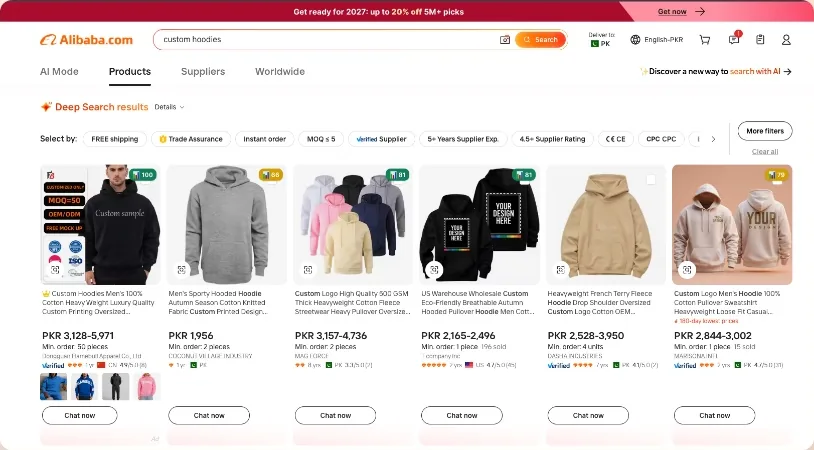
Alibaba search results with AliCatalogSync score badges on every product
Works on the marketplaces you research every day
Alibaba.comAliExpress1688.comYour Alibaba storeExcel bulk uploadTeam accountsMultiple storesMultiple brands Alibaba.comAliExpress1688.comYour Alibaba storeExcel bulk uploadTeam accountsMultiple storesMultiple brands
How it works

From research to your store in 3 steps

No copy and paste between tabs. No messy spreadsheets.

๐Ÿ”

1. Capture

Open any Alibaba, AliExpress or 1688 product and click Import to my store. Title, attributes, price tiers, description, photos and videos are captured.

โœจ

2. Improve

Get a clean, unique title, 3 buyer keywords, your brand, tags and a structured description. Free, or with AI for a full rewrite.

๐Ÿš€

3. Send

Pick the Alibaba category, shipping template and pictures, then send it to your store as a Draft or Publish it.

Listing scores

See every listing's score right in search results

A score badge appears on each product, so you spot the strongest competitors before you open a single page.

00000
  • Green 80+, yellow 50 to 79, red below 50
  • Hover a badge for picture and text scores
  • Scores are saved for next time
Score badges on Alibaba search results
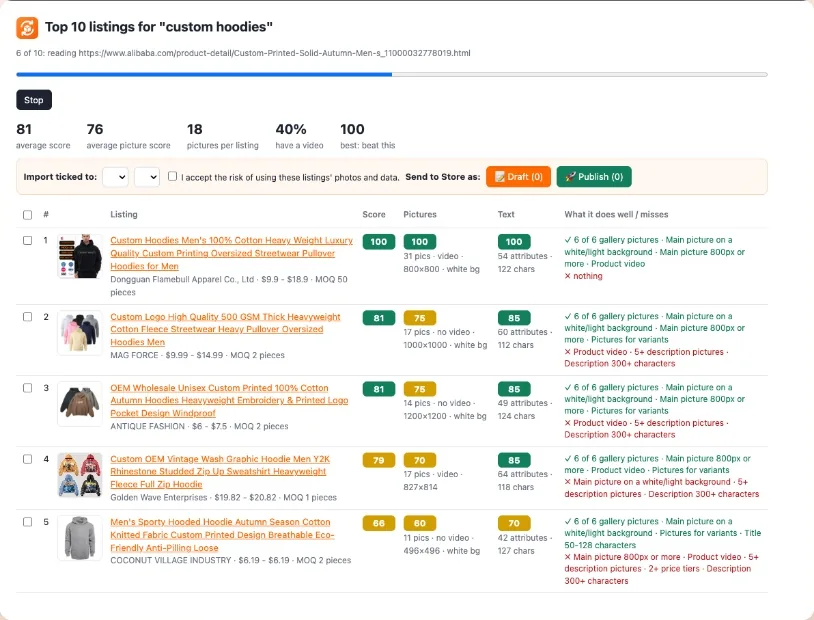
Top 10 analysis

Learn what the top listings do better

One click analyzes the top 10 results: scores, picture quality, and exactly what each listing does well or misses.

  • Score 0 to 100: 60% text, 40% pictures
  • Checks white backgrounds, 800px+ pictures, video, attributes, price tiers
  • Tick listings and send them to your store
Top 10 listings report
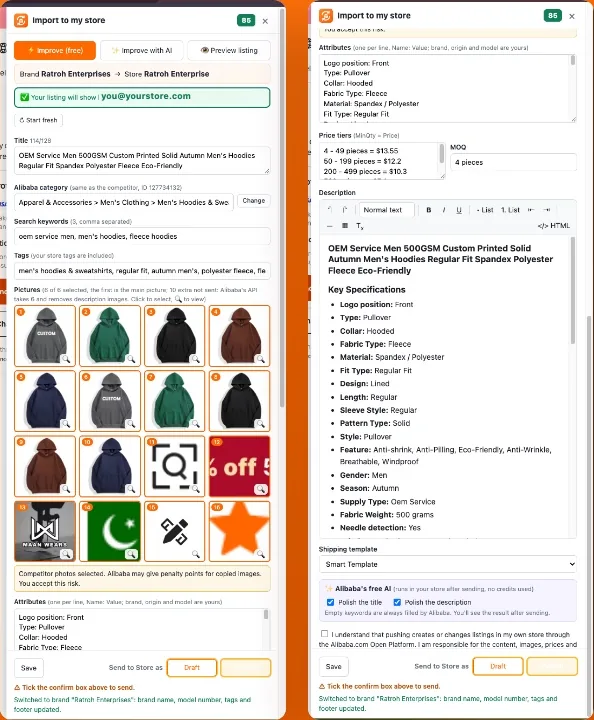
Import to my store

A ready listing, built right on the product page

A side panel builds an optimized listing for your brand and sends it to your Alibaba store. Your brand name, model number, tags and footer are applied for you.

  • Improve for free, or with AI
  • Choose and reorder pictures; the first is the main one
  • Edit attributes, price tiers, MOQ and description in a Word-style editor
Import to my store side panel
Team portal

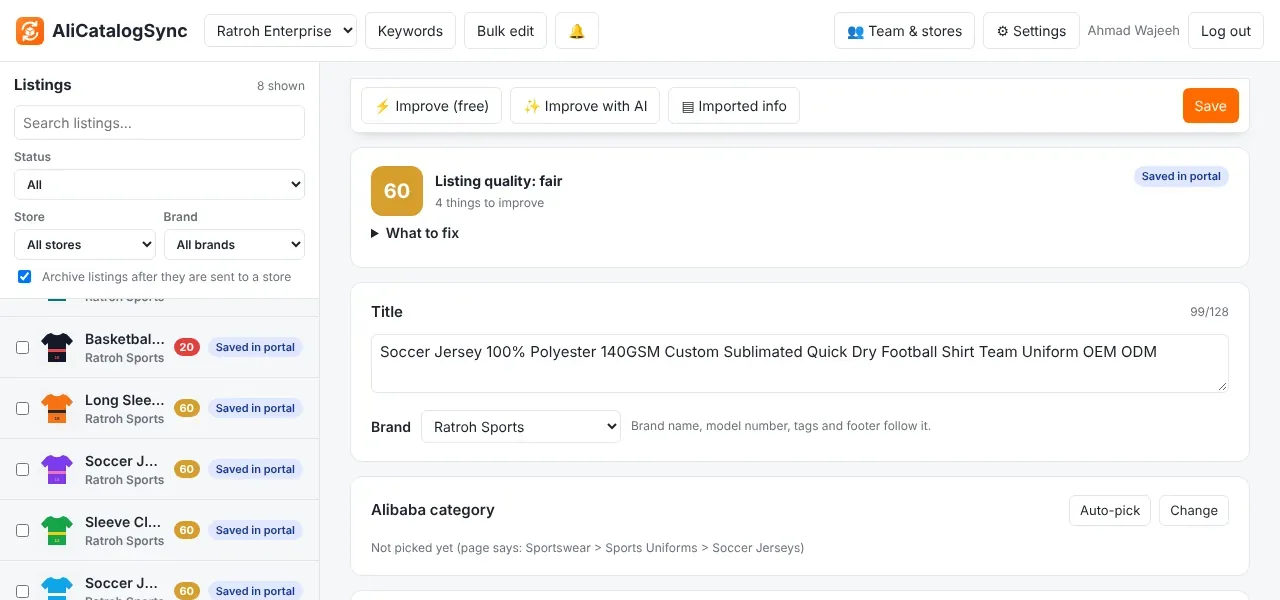
One place for your whole catalog and team

Every captured product lands in your portal. Your team edits, scores and approves listings, then sends them to the right store, or exports them for Alibaba's bulk upload.

  • Several businesses, brands and stores in one account
  • Owner, admin and member roles
  • Excel export that matches the Alibaba bulk-upload template
AliCatalogSync portal listing editor
Everything you need

Built for Alibaba suppliers and listing teams

โšก

Free listing improver

Clean title, 3 keywords buyers actually type, brand and store tags. No AI credits used.

โœจ

Improve with AI

A full rewrite of title, keywords and description when you want more.

๐Ÿ“ฆ

Photos and videos in one zip

Download every image and video from a product page in one click.

๐Ÿ–ฑ๏ธ

Right-click photo menu

Right-click any product photo to save or send it to your listing.

๐Ÿท๏ธ

Already in your store?

See which products you already sell while you browse search results.

๐Ÿ—‚๏ธ

Right category, every time

Pick the category from Alibaba's own list, plus your shipping template.

0marketplaces to research
0top listings analyzed per click
0point listing score
0click to send to your store
FAQ

Questions sellers ask

Who is AliCatalogSync for?

Alibaba.com suppliers, sourcing teams and listing assistants who want better listings with less copy and paste.

Do I need an Alibaba.com store?

To send listings straight to a store, yes, you connect your own Alibaba.com seller account. Without one you can still research, score, capture and export listings to Excel.

Does it copy competitor photos to my store?

No, not automatically. You choose the pictures for every listing. If you pick photos that aren't yours, the panel warns you, and you need to tick a box to accept the risk.

Which browsers are supported?

Google Chrome and other Chromium browsers such as Edge and Brave. The portal works in any modern browser.

Is my data safe?

The extension only reads product pages you choose to capture. Store tokens are encrypted. Read the full privacy policy.

Support

We're here to help

Stuck on a listing, a store connection or the extension? Get in touch and we'll reply within one business day.

โœ‰๏ธ

Email us

Questions, bug reports or data deletion requests.
wajeeh@solutionoir.com

๐Ÿ”‘

Your account

Sign in to manage your team, brands and connected stores.
Open the portal โ†’

๐Ÿ”’

Privacy

What we collect, what we don't, and how to delete your data.
Privacy policy โ†’

Get started

Stop copying listings by hand. Start beating them.

Create your free account, add the Chrome extension, and send your first listing today.